EDR versus antivirus: selecting detection and response that actually stops ransomware
Ransomware crews do not rely on a single exploit or a single file. They chain tactics across email, identities, endpoints, and backups, then move fast. That is why many organisations that still rely on traditional antivirus find out too late that signatures were never the whole answer.
Endpoint Detection and Response (EDR) closes that gap. It watches behaviour, correlates signals, and triggers guided containment in minutes, not days. When backed by a 24/7 Security Operations Centre (SOC), EDR turns alerts into action and gives you audit-ready evidence of what happened and why.
This guide explains what EDR is, how it differs from antivirus, what telemetry it collects, and how it works with SOC and Security Information and Event Management (SIEM) to interrupt real ransomware kill chains. It also provides selection criteria, pros and cons, and a short buyer checklist for Australian organisations, with a clear view of where White Rook Cyber fits.
What EDR is and why it exists
Endpoint Detection and Response is a security capability that continuously monitors endpoints to detect malicious or suspicious behaviour and enable rapid investigation and response. An endpoint is any device that runs your business, including laptops, desktops, servers, and company-managed mobiles and tablets.
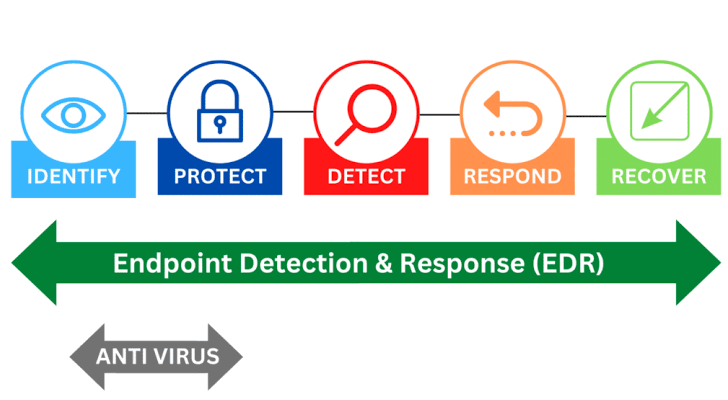
Unlike classic antivirus that focuses on known bad files, EDR records detailed activity on the device and analyses behaviour over time. It reveals how a threat arrived, what processes it spawned, what credentials it attempted to use, which files it touched, and how it moved laterally. With that context, responders can contain the device, kill malicious processes, roll back changes where supported, and improve detections for next time.
How EDR differs from antivirus
Antivirus remains useful for catching known malware and commodity threats. However, modern ransomware operators regularly obfuscate payloads, abuse legitimate tools, and live off the land. EDR addresses this by:
- Behaviour-led detection: spotting suspicious process trees, script engines spawning encoders, or tools like PowerShell or PsExec used atypically.
- Rich telemetry and timelines: tracking process, file, registry, and network activity to reconstruct what happened.
- Response actions: isolating a host from the network, terminating processes, quarantining files, and initiating scripted remediation.
- SOC integration: enabling analysts to correlate endpoint alerts with identity, email, and cloud signals for high-confidence action.
In practice, antivirus is a subset control. EDR is an investigation-and-response platform that covers far more than file scanning.
What telemetry EDR collects
EDR typically captures high-fidelity signals that are invaluable during detection and forensic review:
- Process and command-line events (including parent-child relationships).
- Script engine activity across PowerShell, wscript/cscript, bash, and shellcode loaders.
- File system and registry modifications including encryption-like patterns.
- Network connections and DNS queries, including connections to known command and control hosts.
- User and identity signals where available, such as token usage, suspicious logon times, or credential dumping attempts.
- Security control tampering events, for example attempts to disable services or shadow copy deletion.
When integrated with SIEM and a 24/7 SOC, this endpoint data is enriched with identity and email telemetry to expose full kill chains.
For more on managed endpoint protection in context, see White Rook Cyber’s overview of endpoint detection and response.
Detection, containment, and recovery with a 24/7 SOC
The value of EDR multiplies when SOC analysts watch it around the clock and run tested playbooks.
- Detect: The EDR agent flags a behaviour chain, such as a malicious macro spawning PowerShell that downloads a loader and attempts credential access. SIEM correlates this with an unusual mailbox rule and a failed multifactor authentication sequence.
- Validate: SOC analysts review the process tree, command lines, and network indicators, then check recent detections across the fleet to rule out false positives.
- Contain: A playbook triggers host isolation, kills malicious processes, and blocks indicators across the EDR platform. Identity containment follows, such as forced password resets or conditional access blocks.
- Eradicate and recover: Analysts guide removal of persistence, validate backups, and assist with restore steps. Lessons learned lead to tuned detections, updated allowlists or blocklists, and awareness coaching for impacted users.
This is where White Rook Cyber’s managed security services bring it together with SIEM correlation and playbook-driven response. The outcome is shorter dwell time and clearer evidence for post-incident review.
Real-world ransomware chains interrupted by EDR + SIEM
- Phishing to encryptor: A user receives a phish, opens a lure, and enables macros. EDR marks Office spawning PowerShell with encoded commands, SIEM sees the mailbox rule change and a suspicious OAuth consent. The SOC isolates the device, revokes the consent, resets the account, and prevents the ransomware payload from executing at scale.
- Lateral movement from an unmanaged device: An attacker uses stolen VPN credentials to access the network and pushes tools via PsExec. EDR sees new admin shares, service creation, and credential-dumping behavior. Correlation with identity logs shows impossible travel. The SOC blocks the account, isolates affected hosts, and halts propagation.
If you are building layered resilience, consider adding phishing resilience and awareness programs alongside EDR. White Rook Cyber provides cyber security awareness training that complements technical controls by reducing human risk.
Selection criteria that matter
Choose EDR on capability and fit rather than brand recognition alone. Prioritise:
- Coverage breadth: Desktops, laptops, servers, and company-managed mobiles or tablets.
- Response automation: Host isolation, process kill, quarantine, and scripted rollback where available.
- SOC and MDR fit: Works with a 24/7 SOC, provides robust APIs, and supports playbook automation.
- Telemetry depth: Full command-lines, script visibility, and evidence that stands up to audits.
- Cloud and identity context: Seamless integration with SIEM for identity, email, and cloud signals.
- Performance and usability: Low agent overhead, clear investigations, and role-based access.
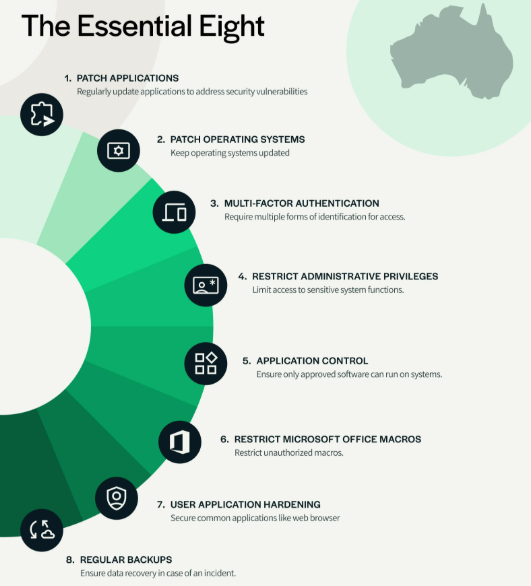
- Compliance reporting: Exportable timelines and artefacts for Essential 8, ISO 27001, and NIST audits.
If ransomware is a board-level concern, ensure the solution integrates with a broader ransomware protection program including immutable backups and incident readiness.
Pros, cons, and misconceptions
Pros:
- Detects unknown and fileless attacks by focusing on behaviour.
- Accelerates investigation with rich timelines and evidence.
- Enables rapid, remote containment to limit blast radius.
- Supports audit and compliance with exportable artefacts.
Cons:
- Generates more data that needs tuning and SOC oversight.
- Requires process maturity to action alerts consistently.
- Licensing and management effort can be higher than AV alone.
Common misconceptions:
- EDR replaces backups. It does not. Maintain 3-2-1 backups with restore testing.
- EDR is only for large enterprises. Managed offerings make it accessible to SMBs.
- Antivirus is enough. It is necessary but insufficient against modern tradecraft.
Which EDR is best and is Microsoft Defender an EDR
There is no single best EDR for every environment. The right choice depends on your device mix, identity provider, existing stack, SOC model, and compliance drivers. Microsoft Defender for Endpoint is a mature EDR platform and is considered an EDR. It can be excellent in Microsoft-centric estates, particularly when paired with strong SOC oversight and SIEM correlation. Other leading platforms can also be a strong fit. The determinant is how well the tool integrates with your operations and how effectively a SOC can run playbooks on it.
An example of EDR in practice
Consider a domain controller targeted for ransomware staging. The EDR agent logs Service Control Manager events, suspicious LSASS access, and a surge in file writes to network shares. A playbook triggers host isolation, forces Kerberos ticket invalidation, and blocks the hash used for lateral movement. The SOC then guides restoration of altered Group Policy Objects and confirms that no encryption occurred. This is EDR doing what AV alone could not.
White Rook Cyber’s managed EDR under MSS
White Rook Cyber deploys and manages EDR as part of its Managed Security Services. The 24/7 SOC correlates endpoint signals with identity, email, and cloud telemetry in the SIEM, then runs tested playbooks to contain threats quickly. Deliverables include guided recovery and audit-ready evidence aligned to Essential 8, ISO 27001, and NIST expectations. For organisations that want assurance before an incident, the team also provides cyber security incident response readiness, tabletop exercises, and rapid response on demand.
If your program also needs structured governance uplift, explore how broader cyber security services Australia can be aligned to your risk profile.
Buyer checklist for Australian organisations
- Confirm coverage for Windows, macOS, Linux, servers, and company-managed mobiles or tablets.
- Validate SOC integration, including SIEM use cases and playbook automation.
- Ask for sample investigation timelines and evidence exports for audits.
- Test host isolation, process kill, quarantine, and rollback in a pilot.
- Ensure identity and email correlation to catch phishing-led intrusions.
- Map to Essential 8 maturity targets and ensure reporting supports attestations.
To connect these controls with staff behaviour change, consider pairing EDR with practical online security awareness training that reduces click-through risk and speeds reporting.
FAQ
- What is Endpoint Detection and Response?
EDR is continuous monitoring and response on endpoints that detects suspicious behaviour, provides investigation timelines, and enables rapid containment.
- How is EDR different from antivirus?
Antivirus focuses on known malware. EDR analyses behaviour, reconstructs attacks, and supports response actions like isolation and rollback.
- What data does EDR collect?
Process and command-line events, script activity, file and registry changes, network connections, identity-related signals, and attempts to tamper with controls.
- Which EDR is best?
There is no universal best. Choose based on coverage, integration with your SOC and SIEM, telemetry depth, performance, and compliance reporting.
- Is Microsoft Defender an EDR?
Yes. Microsoft Defender for Endpoint is an EDR platform. Fit depends on your stack and operational model.
- What are the disadvantages of EDR?
More data and alerts to manage, a need for SOC oversight and process maturity, and potentially higher management effort than AV alone.
- What is an example of an EDR?
An example is an EDR agent that isolates a host after detecting PowerShell spawned by Office, blocking a ransomware payload before encryption.
Summary and next steps
EDR is now a foundational control against ransomware because it sees behaviour, not just files, and it enables fast, remote containment. The difference between success and failure often lies in SOC integration and execution. White Rook Cyber delivers managed EDR within a 24/7 SOC, backed by SIEM correlation, tested playbooks, and audit-ready evidence. If you are reviewing options or planning a pilot, speak with White Rook Cyber about managed security services and incident response readiness.
Helpful resources:
- Learn more about endpoint detection and response in our managed service overview: https://whiterook.dev.slnet.com.au/managed-services/endpoint-detection-response-edr
- Explore ransomware protection as a layered program: https://whiterook.dev.slnet.com.au/managed-services/ransomware-protection
- See how our SOC and SIEM correlation ties signals together: https://whiterook.dev.slnet.com.au/managed-services/soc-siem
- Build staff resilience with cyber security awareness training: https://whiterook.dev.slnet.com.au/managed-services/awareness-training